What's changing
AI CTRL will use GPT-5.6 Luna as the background task model. Luna will handle:
- Generating conversation titles and tags
- Internal routing decisions
- Other behind-the-scenes platform tasks
How it will be implemented
GPT-5.6 Luna will be set to Public and configured as the platform's External Task Model. This means AI CTRL will use Luna for task-related functionality automatically, and it will also appear as a selectable model for users who want to use it directly for their own conversations.
How to hide Luna from the model selector
If you don't want users selecting Luna as a standard model once this update is live, you can hide it while it continues to run task-related functions in the background:
- Open Admin Panel → Settings → Models.
- Select the three dots (…) next to GPT-5.6 Luna.
- Choose Hide Model.
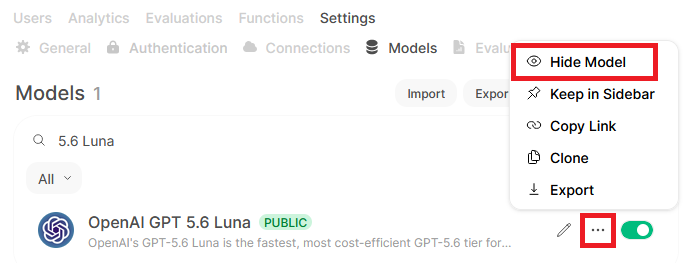
Hiding Luna from the model selector will not disable it as the External Task Model. Background functions (titles, tags, routing) will continue to use Luna regardless of this setting.
Why GPT-5.6 Luna
Luna is the fastest and most cost-efficient model in the GPT-5.6 family, suited to high-volume routine tasks: classification, summarization, drafting, extraction, routing, and structured output. Using it for background platform tasks reduces cost and latency compared with routing those tasks through a larger reasoning model.
New Models
One model is new with this release:
- Gemini 3.8 (Google) — the latest Gemini release
Gemini 3.8 will be deployed as Private, so it won't be visible to users until your administrators grant access. If you don't see it in your model list, ask your admin. Credit rates are on the AI CTRL Ratecard.
OIDC ID token validation: upcoming fix
Between v0.9.6 and v0.10.2, the authentication library AI CTRL uses (Authlib) will be upgraded from 1.6.10 to 1.7.2. That upgrade replaces Authlib's own OIDC ID token validation with joserfc's stricter default validation, which could reject some valid ID token values that earlier versions accepted without issue.
This release will restore support for those token values, reducing the risk of SSO login failures caused by the stricter validation.